Teo
Downloading Teo
Only for Macs with Apple silicon (M1 or newer). Teo does not run on Intel Macs yet.
The download starts by itself. Did not start? Press the button.
macOS will show a warning. This is normal. Follow three steps.
Open the .dmg file. Drag Teo into "Applications".

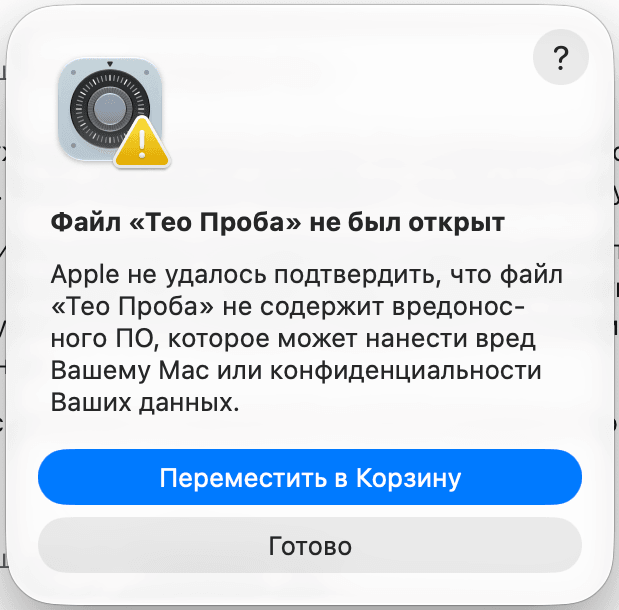
Open Teo. When macOS warns you, click "Done".
Open "System Settings", then "Privacy & Security". Click "Open Anyway" and enter your password.
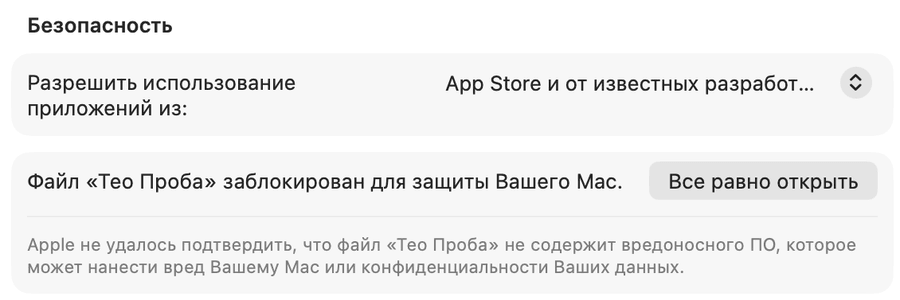
The warning appears because the installer has no paid signature yet. The file is genuine.
In the pictures the app is named "Teo Probe". Yours will say "Teo".